Dont you just love it when simple things take more of your time than you actually anticipate? Well I had one of those moments just days ago.
The issue was that a user complained that when he turned on his machine in the morning, all his desktop icons mysteriously disappeared. I was a abit skeptical at first since he assured me that he had not changed anything. So I remotely connected to his computer, and found that he wasnt telling fibs. The icons had literally disappeared and all that was left was the desktop wallpaper.
At first I thought his user profile would be corrupted so thought to give it a simple test. I right clicked on the desktop and created a new text document. The process went through without any errors but the new icon failed to show on the desktop. I checked his user profile folder to see if the icon had been created. This can be found using the environment variable %userprofile%. So I looked at %userprofile%\desktop and found that a new text document had been created although it didnt show on the desktop. Ahem. Time for some head scratching.
Doing a quick search on the internet revealed the answer to me, and when I realised how simple it was, I could have almost kicked myself (but then I thought otherwise :) )
Anyways to get to the point, all I needed to do was the following
1. Right click on the Desktop and then click on View
2. A sub menu will show and there check to see if Show desktop icons is ticked. In my case it wasnt.
3. Click the Show desktop icons option and then when you return to the desktop, all your icons would have returned
4. You can click the Show desktop icons option again to hide the icons
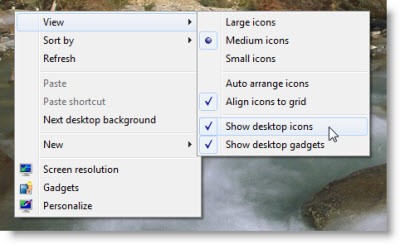
Viola! Didnt I tell you that it was soo simple ;)
The above solution (and the image above) was copied from http://www.thewindowsclub.com/desktop-icons-not-showing-windows-7
Showing posts with label desktop. Show all posts
Sunday, February 5, 2012
Sunday, July 19, 2009
K-Meleon The best lighweight web browser by far
After switching to a laptop, one of my goals has been to find alternates to my everyday desktop software so that I could run them with the slightest expense to the cpu and memory. Laptops have gained far more popularity in the last few days than desktops, more because they provide a way for people to be mobile yet be connected. But as you all know, to get a comparable power in a laptop, you have to fork out more dollars. These go towards paying for the price of being mobile. Also, upgrading a laptop is not as easy as a desktop. So the more juice you can squeeze out of your current laptop specs, the better mileage you will get.
I find that 85% of my time spent on my laptop is spent using a web browser. Be this Internet Explorer, Opera, Safari or Firefox. Now you might ask, why have so many browsers when they all do the same thing. In reply, I would ask you a question, why do we have so many models/brands of cars when they all do the same thing? It all boils down to the mileage you get out of something. Each browser is good in its own realm. But one thing I have found similar with all the modern browsers is that they grab a lot of system memory and cpu speed. This makes the overal performance of my laptop slower. The latest version of Firefox (3.5) is even more demanding than its predecessors. It takes a while to start and this it seems is because it is loading up a lot of things into memory. And given time, Firefox, Opera, Safari and Internet Explorer all cross the 200MB RAM limit.
I finally found a light weight browser that appealed to me and I found it by sheer chance. Its name is K-Meleon. It is built on the Gecko engine. This is the same engine that Firefox uses. It has tab browsing, macro and mouse gestures. It allows you to customize your search engine. But the biggest difference compared to the other browsers is that it doesnt take as much memory. I have been running it continuous for 3 days now and it hasnt gone beyond 80MB of RAM. And thats with 5 tabs open. I am truely impressed.
Give this browser a try. I am sure you will like it from the first time you start using it. You can download it from http://kmeleon.sourceforge.net/
I find that 85% of my time spent on my laptop is spent using a web browser. Be this Internet Explorer, Opera, Safari or Firefox. Now you might ask, why have so many browsers when they all do the same thing. In reply, I would ask you a question, why do we have so many models/brands of cars when they all do the same thing? It all boils down to the mileage you get out of something. Each browser is good in its own realm. But one thing I have found similar with all the modern browsers is that they grab a lot of system memory and cpu speed. This makes the overal performance of my laptop slower. The latest version of Firefox (3.5) is even more demanding than its predecessors. It takes a while to start and this it seems is because it is loading up a lot of things into memory. And given time, Firefox, Opera, Safari and Internet Explorer all cross the 200MB RAM limit.
I finally found a light weight browser that appealed to me and I found it by sheer chance. Its name is K-Meleon. It is built on the Gecko engine. This is the same engine that Firefox uses. It has tab browsing, macro and mouse gestures. It allows you to customize your search engine. But the biggest difference compared to the other browsers is that it doesnt take as much memory. I have been running it continuous for 3 days now and it hasnt gone beyond 80MB of RAM. And thats with 5 tabs open. I am truely impressed.
Give this browser a try. I am sure you will like it from the first time you start using it. You can download it from http://kmeleon.sourceforge.net/
Subscribe to:
Posts (Atom)