While backing up Exchange Stores on a Microsoft Exchange 2003 server for a friend using the ol' faithful Windows NTBackup, I came across the following error.
Backup Status
Operation: Backup
Active backup destination: File
Media name: "exchange_backup.bkf created 18/07/2011 at 10:33 PM"
Volume shadow copy creation: Attempt 1.
Backup of "ExchSrvr01\Microsoft Information Store\First Storage Group"
Backup set #1 on media #1
Backup description: "Set created 18/07/2011 at 10:33 PM"
Media name: "exchange_backup.bkf created 18/07/2011 at 10:33 PM"
Backup Type: Normal
Backup started on 18/07/2011 at 10:33 PM.
The 'Microsoft Information Store' returned 'Backup is already active.
' from a call to 'HrESEBackupSetup()' additional data '-'The 'Microsoft Information Store' returned 'Functions called in an invalid sequence.
' from a call to 'HrESEBackupClose()' additional data '-'
The operation was ended.
Backup completed on 18/07/2011 at 10:33 PM.
Directories: 0
Files: 0
Bytes: 0
Time: 1 second
----------------------
The operation did not successfully complete.
----------------------
Failing to remember any solutions off hand, I consulted the Oracle, (Google is the almighty I am talking about). In return for my search, I got hundreds of matches. I opened the first one, as it was from Microsoft Support http://support.microsoft.com/kb/820272. This said that I had my Exchange Server Databases installed on the same drive as my operating system. Due to this the backup was failing. This did not fit my situation so I trawled further.
Persistence and bullheadedness is the recipe to success and Viola! I found my answer. To be quite honest, when I read it, I thought it to be too simple to work. I said to myself, if this works, I will be a monkey's uncle. And as it stands, a happy monkey has just inherited me as their uncle :)
The problem was due to the simple fact that circular logging was enabled on the Storage Group. I disabled it, restarted the Microsoft Exchange Information Store service and tried NTBackup again. To my hearts joy, it worked :) (exact article can be found here http://www.tek-tips.com/viewthread.cfm?qid=1182209&page=1
Have a great week.
Showing posts with label microsoft. Show all posts
Showing posts with label microsoft. Show all posts
Monday, July 18, 2011


Friday, June 3, 2011
Are you migrating to Exchange 2010? Need Help removing Exchange 2003?
Hi All.
I know it has been a while since my last post. All I can say is that things have been very hectic and I have not had time to put up any new things. I do tweet or re-twitter from time to time, so for those that would like to hear more from me, you can follow me at twitter.com/nivleshc
For the past few weeks I have been removing our Legacy Email Servers (there you go. Now you know that we have moved off Exchange 2003 :) ). Uninstalling Exchange 2003 can be a breeze if things work well but for those moments when things just grind to a standstill, everything seems to break around you and you feel like the sky is falling, you need to know where your nearest life line is. You could call me :) or you could use the following links to make the uninstall a much smoother ride.
Here you go, some useful links
1. I found this to be a very good place to start. It covers both automatically uninstalling and manual uninstalls.
KB833396: How to Remove Exchange 2003 from your Computer
2. Another link, but this time from MSExchange.org.
Remove Exchange Server from Entire Exchange Organization
If you still find yourself in deep water, send me an email and I will try to help you out.
Have a great and trouble free weekend.
I know it has been a while since my last post. All I can say is that things have been very hectic and I have not had time to put up any new things. I do tweet or re-twitter from time to time, so for those that would like to hear more from me, you can follow me at twitter.com/nivleshc
For the past few weeks I have been removing our Legacy Email Servers (there you go. Now you know that we have moved off Exchange 2003 :) ). Uninstalling Exchange 2003 can be a breeze if things work well but for those moments when things just grind to a standstill, everything seems to break around you and you feel like the sky is falling, you need to know where your nearest life line is. You could call me :) or you could use the following links to make the uninstall a much smoother ride.
Here you go, some useful links
1. I found this to be a very good place to start. It covers both automatically uninstalling and manual uninstalls.
KB833396: How to Remove Exchange 2003 from your Computer
2. Another link, but this time from MSExchange.org.
Remove Exchange Server from Entire Exchange Organization
If you still find yourself in deep water, send me an email and I will try to help you out.
Have a great and trouble free weekend.
Monday, August 17, 2009
Remove hidden data from Office documents
Collaboration holds a very important role in todays world. The web allows multiple people contribute to a document with ease. For instance, the author of the document and the proof reader could be continents apart yet they could share documents within minutes.
When such documents are made available to the general public, care should be taken to not disclose information that needs to be kept private. For instance, records of changes done by each collaborater (change tracking and comments) should be removed before the document is made public. There are two ways this can be done. One is to change the document into a PDF. The other is to use the Office 2003/XP Addin: Remove Hidden Data . This tool is built into Office 2007, so you dont need a separate download.
You can find more details about this tool here
Have fun. Hope your monday is going good.
When such documents are made available to the general public, care should be taken to not disclose information that needs to be kept private. For instance, records of changes done by each collaborater (change tracking and comments) should be removed before the document is made public. There are two ways this can be done. One is to change the document into a PDF. The other is to use the Office 2003/XP Addin: Remove Hidden Data . This tool is built into Office 2007, so you dont need a separate download.
You can find more details about this tool here
Have fun. Hope your monday is going good.
Sunday, August 16, 2009
Windows requires a digitally signed driver!
Microsoft seems to have an age old vendetta against driver manufacturers. With every new version of Microsoft OS, there are always driver woes that come packaged with it.
Windows 7 is no different. If you are installing system drivers, they need to be digitally signed by Microsoft or else you will get the following message.

Vendors need to purchase a certificate from Microsoft to include in their driver to ensure they dont get the above message. This can be an issue when you have software you already own and are moving to Windows 7. This was the issue I was having when installing Vmware Server on Windows 7.
Fortunately there is a way to get around this issue.
Firstly we need to change a group policy so that windows ignores drivers that are not signed instead of blocking them.
1. Press on Start and then type gpedit.msc in the bottom textfield (this has has got a light gray text that says Search programs and files)
2. The Local Group Policy Editor will start up.
3. Browse down to the Local Computer Policy\User Configuration\Administrative Templates\System\Driver Configuration
On the right side window, double click on Code signing for device drivers
Click on Enable and in options choose Ignore for the When Windows detects a driver file without a digital signature:
4. Close the Local Policy Editor and restart your computer.
5. Install your program.
6. Now you have to note down which drivers are being stopped from running by Windows. Check the event logs (Go to Start and then type eventvwr and press enter and look under System logs)
7. Before anything, disable UAC
8. Then download the Driver Signature Enforcement Overrider 1.3b (DSEO).
9. Install DSEO and start it. You will get the following menu.
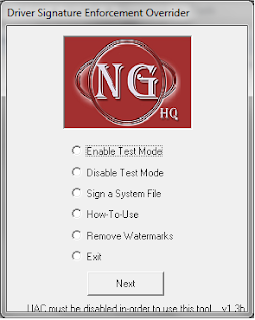
10. Select Test Mode and click Next
11. After that select Sign a System File and click Next. In the path put in the full path and filename of the drivers that you want to sign (step 6 above)
12. Once you have signed all the drivers, restart your computer and that should now run the drivers that you were having problems with.
Hope that helps you all. Cheers.
Windows 7 is no different. If you are installing system drivers, they need to be digitally signed by Microsoft or else you will get the following message.

Vendors need to purchase a certificate from Microsoft to include in their driver to ensure they dont get the above message. This can be an issue when you have software you already own and are moving to Windows 7. This was the issue I was having when installing Vmware Server on Windows 7.
Fortunately there is a way to get around this issue.
Firstly we need to change a group policy so that windows ignores drivers that are not signed instead of blocking them.
1. Press on Start and then type gpedit.msc in the bottom textfield (this has has got a light gray text that says Search programs and files)
2. The Local Group Policy Editor will start up.
3. Browse down to the Local Computer Policy\User Configuration\Administrative Templates\System\Driver Configuration
On the right side window, double click on Code signing for device drivers
Click on Enable and in options choose Ignore for the When Windows detects a driver file without a digital signature:
4. Close the Local Policy Editor and restart your computer.
5. Install your program.
6. Now you have to note down which drivers are being stopped from running by Windows. Check the event logs (Go to Start and then type eventvwr and press enter and look under System logs)
7. Before anything, disable UAC
8. Then download the Driver Signature Enforcement Overrider 1.3b (DSEO).
9. Install DSEO and start it. You will get the following menu.

10. Select Test Mode and click Next
11. After that select Sign a System File and click Next. In the path put in the full path and filename of the drivers that you want to sign (step 6 above)
12. Once you have signed all the drivers, restart your computer and that should now run the drivers that you were having problems with.
Hope that helps you all. Cheers.
How to disable UAC in Windows 7 and Windows Vista
For those of you that have moved on to Windows Vista or are pioneering Windows 7, one of the most annoying feature you will come across is the constant nagging when you try installing something or carrying out some system changes. Windows provides you with screens asking if you would like to carry out the task over and over again. Sorta reminds me of donkey from Shrek (are we there yet .. are we there yet .. are we there yet... oooh what a great movie that was). Well if you want, you can easily disable this feature (but be warned that then you will not be asked for a confirmation, even if the task is carried out by some rogue program).
BTW this feature is called User Access Control (UAC)
1. Click on Start and then click on Run.
2. Type msconfig in the window that comes up press enter
3. The System Configuration screen will come up. Click on the Tools tab.
4. Select Change UAC Settings by highlighting it and click on Launch
5. In Vista, a command prompt window comes up while in Windows 7 the User Access Control Settings window will come up.
6. Vista: close the command prompt when it finishes
Windows 7: Select the setting you want and click OK.
7. Restart your computer to activate the settings.
BTW this feature is called User Access Control (UAC)
1. Click on Start and then click on Run.
2. Type msconfig in the window that comes up press enter
3. The System Configuration screen will come up. Click on the Tools tab.
4. Select Change UAC Settings by highlighting it and click on Launch
5. In Vista, a command prompt window comes up while in Windows 7 the User Access Control Settings window will come up.
6. Vista: close the command prompt when it finishes
Windows 7: Select the setting you want and click OK.
7. Restart your computer to activate the settings.
Sunday, July 12, 2009
A new monopoly in the making?
Microsoft has been in the OS industry for ages. Their debut came in 1981 with the release of MSDOS 1.0. And years later, here we are, with Microsoft dominating the desktops and servers of this world.
Google was started as a search engine in 1996. It was to rival the likes of Yahoo and Altavista. And this it did with such grace and perfection that now it is the search giant of the web industry. Google has become a verb that is known to pretty much everyone.
One of the things that Google is really good at is trying out new things. They dabbled their toes in emails with gmail, with cloud computing by offering GoogleApps. Then they wanted to try out the mobile market by releasing their open source mobile OS, Android. After that it was the release of Chrome, their flagship web browser, which gave Internet Explorer a run for its money.
And now Google has announced that they would like to scratch a mark of their own in the OS industry. They are looking at releasing Google Chrome OS, which will be in direct competition with Microsoft Windows. If Google gets as much fame and popularity in the OS market as it did in the search market, Microsoft will surely have a lot to worry about. Finally there will be a competitor that Microsoft will have to look out for. But then with pretty much taking over every part of the technological market under its wings, are we looking at a world domination from Google? Just imagine what this means? Already we have a Google satellite looking down at us, and then to have Google on our phones and not too far away, on our desktops and laptops?
Google was started as a search engine in 1996. It was to rival the likes of Yahoo and Altavista. And this it did with such grace and perfection that now it is the search giant of the web industry. Google has become a verb that is known to pretty much everyone.
One of the things that Google is really good at is trying out new things. They dabbled their toes in emails with gmail, with cloud computing by offering GoogleApps. Then they wanted to try out the mobile market by releasing their open source mobile OS, Android. After that it was the release of Chrome, their flagship web browser, which gave Internet Explorer a run for its money.
And now Google has announced that they would like to scratch a mark of their own in the OS industry. They are looking at releasing Google Chrome OS, which will be in direct competition with Microsoft Windows. If Google gets as much fame and popularity in the OS market as it did in the search market, Microsoft will surely have a lot to worry about. Finally there will be a competitor that Microsoft will have to look out for. But then with pretty much taking over every part of the technological market under its wings, are we looking at a world domination from Google? Just imagine what this means? Already we have a Google satellite looking down at us, and then to have Google on our phones and not too far away, on our desktops and laptops?
Sunday, September 7, 2008
Week 36 Article 01 - Whats with this Microsoft Ad?
I was left scratching my head after looking at this Windows Advertisement. Is it that Windows will be come more Delicious in the future? Delicious to who? Hackers, pirates or customers?
Some of the things that this advertisement has left behind with me are as follows
1. Are you for real? Bill Gates at a mall Shoe shop with no security guards? If I knew Bill was coming to town, I would be there to either catch a glimpse of him or to pass on my pages of woes about Windows, and Microsoft as a whole. And I bet there will be others with the same mentality.
2. Whats with the shop name .. Shoe Cirus? Is that supposed to make me think that Microsoft is made of clowns?
3. Seinfeld? Ahem wasnt he in the ad for apple some time back?
4. I dont hear anything about Windows till the last few seconds, even that is unclear. Is this another of Microsoft's tricks to dupe people?
Ahem does the Mojave Experiment come to mind? Lets discuss a few things about this experiment. First of all, are these people off the street or paid actors? What was the spec of the machines Vista was installed during the experiment? Was it just any pc picked from the crowd or was it a new machine bought especially for this experiment that had twice of everything in the Recommended Systems Requirements pasted on the Vista box? Did they even test Vista with all the printers out there? How about those programs that have broken after upgrading from XP to Vista?
I have a feeling that Microsoft is now realising that it is not the choice of the millions any more. There has been competition in the past from linux and apple but not to the extent that it is these days. Microsoft is now trying to pull people back after pushing their crap onto them for years. With the new Internet Explorer rival from Google, Microsoft is standing again on shaky ground. Google has employed what MS did some years back when they brought out Internet Explorer. They bundled IE with Windows, and people found it easier to use that than download a browser from any other place. Now that most of the search happens on google, why wouldn't you go for a browser that gives you more customized response for your searches? Googles dream of creating a cloudsphere has started with the release of Chrome , which is said to be a Web OS
R.I.P Microsoft :(
But I must say, had it not been for Microsoft, I would be without a job. I spend my days fixing problems created by Micrsoft, so I guess I shouldnt be complaining hehe. Thumbs up on the good job Microsoft. Please introduce more software bugs so that I can make a killing providing support to all the MS users.
Some of the things that this advertisement has left behind with me are as follows
1. Are you for real? Bill Gates at a mall Shoe shop with no security guards? If I knew Bill was coming to town, I would be there to either catch a glimpse of him or to pass on my pages of woes about Windows, and Microsoft as a whole. And I bet there will be others with the same mentality.
2. Whats with the shop name .. Shoe Cirus? Is that supposed to make me think that Microsoft is made of clowns?
3. Seinfeld? Ahem wasnt he in the ad for apple some time back?
4. I dont hear anything about Windows till the last few seconds, even that is unclear. Is this another of Microsoft's tricks to dupe people?
Ahem does the Mojave Experiment come to mind? Lets discuss a few things about this experiment. First of all, are these people off the street or paid actors? What was the spec of the machines Vista was installed during the experiment? Was it just any pc picked from the crowd or was it a new machine bought especially for this experiment that had twice of everything in the Recommended Systems Requirements pasted on the Vista box? Did they even test Vista with all the printers out there? How about those programs that have broken after upgrading from XP to Vista?
I have a feeling that Microsoft is now realising that it is not the choice of the millions any more. There has been competition in the past from linux and apple but not to the extent that it is these days. Microsoft is now trying to pull people back after pushing their crap onto them for years. With the new Internet Explorer rival from Google, Microsoft is standing again on shaky ground. Google has employed what MS did some years back when they brought out Internet Explorer. They bundled IE with Windows, and people found it easier to use that than download a browser from any other place. Now that most of the search happens on google, why wouldn't you go for a browser that gives you more customized response for your searches? Googles dream of creating a cloudsphere has started with the release of Chrome , which is said to be a Web OS
R.I.P Microsoft :(
But I must say, had it not been for Microsoft, I would be without a job. I spend my days fixing problems created by Micrsoft, so I guess I shouldnt be complaining hehe. Thumbs up on the good job Microsoft. Please introduce more software bugs so that I can make a killing providing support to all the MS users.
Wednesday, July 23, 2008
Week 30 Article 01 - Moving/Editing Autocomplete Entries in Microsoft Outlook
As technology advances I have noticed that we get more and more lazy. Where once people used to walk for hours to get to their destination, they now just sit down in their car and drive. Where once lots and lots of paper was used to do calculations, now a computer churns out the figures. Dont get me wrong. I love technology but there are times when I wonder .. is it making us more dumb?
With the release of Outlook XP (I might be wrong with the version, so do point out if I am), came the famous autocomplete feature. This used to be one of the popular feature of Outlook Express because people found it too hard to add email addresses to their contact lists. Note that though autocomplete is now available in Outlook, it doesnt populate your contact list as the similar feature in Outlook Express did. So if you were to move pcs for whatever reason, unless you copy over the autocomplete file (which microsoft has neatly hidden), you will have to remember all those email addresses all over again! (serves you right for being lazy I say!!)
Well I hate playing devils advocate so I will now give you the solution to your autocomplete woes.
Migrating to a New PC
When you are moving to a new pc, configure Outlook and make sure that you can send/receive emails using it. Send a test email out and check to see that the address you sent the email to is autocompleted when you send another email to the same address.
On the new pc go to c:\Documents and Settings\{Username}\Application Data\Microsoft\Outlook and rename the files with the extension nk2 (eg rename it to outlook.nk2.old). These might be hidden so make sure you enable show hidden files.
On the old pc go to C:\Documents and Settings\{Username}\Application Data\Microsoft\Outlook and copy the nk2 files to the new pc. When copying them over to the new pc, make sure they have the same name as the files that you just renamed in the step above.
Open your outlook and test to see if your old email addresses are autocompleted.
Editing NK2 File
Sometimes there are errors in the autocomplete list. For instance if a person changes email address, when you type in the first few characters of his name, autocomplete put in his old address and this can result in email issues. To circumvent this, you can use this free software called NK2View from NirSoft. It allows you to view/delete/edit your autocomplete entries. Now isnt that smart?
With this I wish you a happy week.
With the release of Outlook XP (I might be wrong with the version, so do point out if I am), came the famous autocomplete feature. This used to be one of the popular feature of Outlook Express because people found it too hard to add email addresses to their contact lists. Note that though autocomplete is now available in Outlook, it doesnt populate your contact list as the similar feature in Outlook Express did. So if you were to move pcs for whatever reason, unless you copy over the autocomplete file (which microsoft has neatly hidden), you will have to remember all those email addresses all over again! (serves you right for being lazy I say!!)
Well I hate playing devils advocate so I will now give you the solution to your autocomplete woes.
Migrating to a New PC
When you are moving to a new pc, configure Outlook and make sure that you can send/receive emails using it. Send a test email out and check to see that the address you sent the email to is autocompleted when you send another email to the same address.
On the new pc go to c:\Documents and Settings\{Username}\Application Data\Microsoft\Outlook and rename the files with the extension nk2 (eg rename it to outlook.nk2.old). These might be hidden so make sure you enable show hidden files.
On the old pc go to C:\Documents and Settings\{Username}\Application Data\Microsoft\Outlook and copy the nk2 files to the new pc. When copying them over to the new pc, make sure they have the same name as the files that you just renamed in the step above.
Open your outlook and test to see if your old email addresses are autocompleted.
Editing NK2 File
Sometimes there are errors in the autocomplete list. For instance if a person changes email address, when you type in the first few characters of his name, autocomplete put in his old address and this can result in email issues. To circumvent this, you can use this free software called NK2View from NirSoft. It allows you to view/delete/edit your autocomplete entries. Now isnt that smart?
With this I wish you a happy week.
Subscribe to:
Posts (Atom)


 Posts
Posts


